
The conversation around AI at work has moved past whether to use it.
The real question now is harder: how do you lead a team where half the routine work can be done by software, and the other half matters more than ever?
You don’t need to become a data scientist. Nobody’s asking for that. What the job actually demands is comfort with a new division of labor, machines handling pattern-finding and first drafts, people handling judgment, taste, and each other.
Gartner projected that by 2026, 80% of enterprises would have used generative AI APIs or deployed generative AI-enabled applications, up from less than 5% in 2023.
We’re there now. Most of those deployments are underwhelming.
The gap between the teams getting real value and the teams with an expensive Copilot license nobody opens comes down to leadership behavior, not tooling.
This article covers five strategies that actually move that needle, plus the failure modes that show up when you skip the boring parts.
What AI Actually Is Inside a Business
Strip the marketing away, and you’re left with four tool categories that keep showing up on real teams:
- Predictive models that forecast demand, churn, risk, or delays
- Generative tools that draft text, code, slides, and analysis summaries
- Automation for rules-based work like routing, data entry, and scheduling
- Recommenders that personalize content, learning paths, or next-best actions
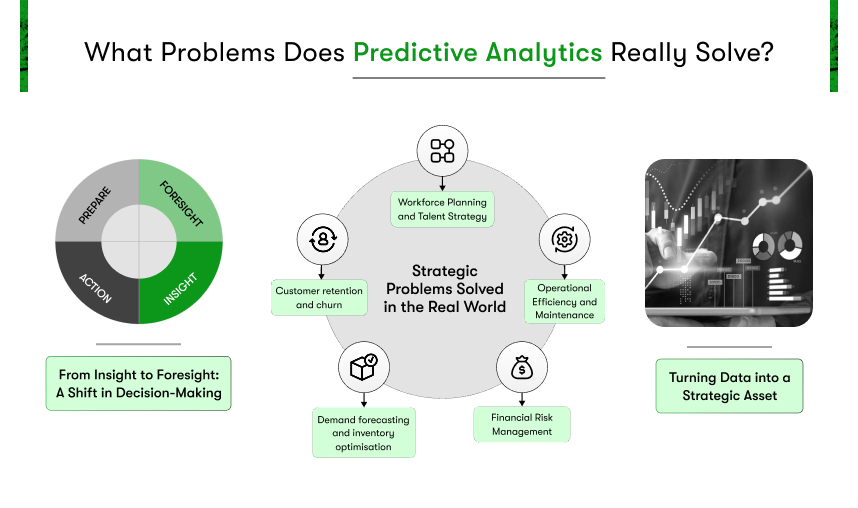
That’s it. Everything else is a combination.
The thing worth internalizing early: productivity gains are not automatic. Buying software changes nothing. Microsoft’s Work Trend Index found people who use AI report time savings and quality improvements, but the biggest wins showed up on teams with clear norms for how, when, and where to use it. Norms. Not licenses.
Leadership itself is bending toward something new here. Less hero problem-solving, more system design. The instinct to be the smartest person in the room becomes a liability when the room includes a model that’s read more than you ever will. What can’t be outsourced is knowing which question to ask, and knowing when the answer smells wrong.
Strategy 1: Sharper Decision-Making
Most recurring business decisions are made the same way they were made fifteen years ago: a spreadsheet, some gut feel, a meeting. AI’s first real contribution isn’t replacing that judgment. It’s widening the field of view before judgment gets applied.
Retailers who moved from spreadsheet forecasting to machine learning saw better forecast accuracy and fewer stockouts and markdowns, and the gap widened exactly when demand got volatile. Volatility is where humans guess the worst. That’s where the models earn their keep.
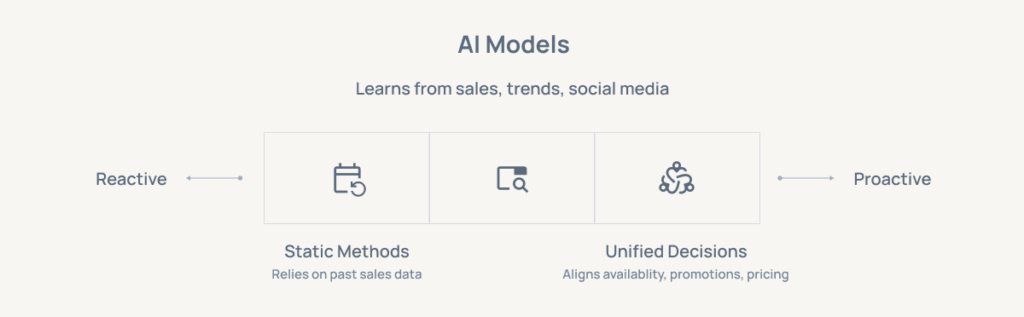
The lesson travels well beyond retail. But it only travels if you set it up deliberately.
How to instrument one decision
Don’t try to make the whole company data-driven. Pick one decision.
- Choose something recurring and high-impact: Pricing, staffing levels, inventory. Something you decide every week or month, where being wrong has a visible cost.
- Define what good looks like before you start. Agree on the outcome metric and the cost of error. If you can’t articulate what a bad call costs, you can’t evaluate whether the model helps.
- Get the data in one place. Finance, ops, sales, and support data rarely line up on the first attempt. Budget time for this. It’s always more than you think.
- Run the model in parallel for 4-6 weeks. AI-assisted recommendation alongside the current process. Same decisions, two methods, compare.
- Build the ritual. A recurring forum where the dashboard gets looked at, the logic gets documented, and human overrides get recorded with reasons.
- Close the loop each cycle. Review accuracy. Look for drift and bias. Update the inputs.
The override log matters more than people expect. Six months in, it tells you whether your team trusts the model too much, too little, or in exactly the wrong situations.
Strategy 2: Automating the Busywork
Every team has a layer of work nobody chose. Copying data between systems. Assembling the Monday status report from four sources. Scheduling across three calendars. This layer is invisible in strategy decks and enormous in reality, and it’s the cheapest thing to fix.
The evidence here is unusually clear. In GitHub’s controlled study, developers using Copilot completed tasks 55% faster than the control group, and reported lower cognitive load on repetitive work.
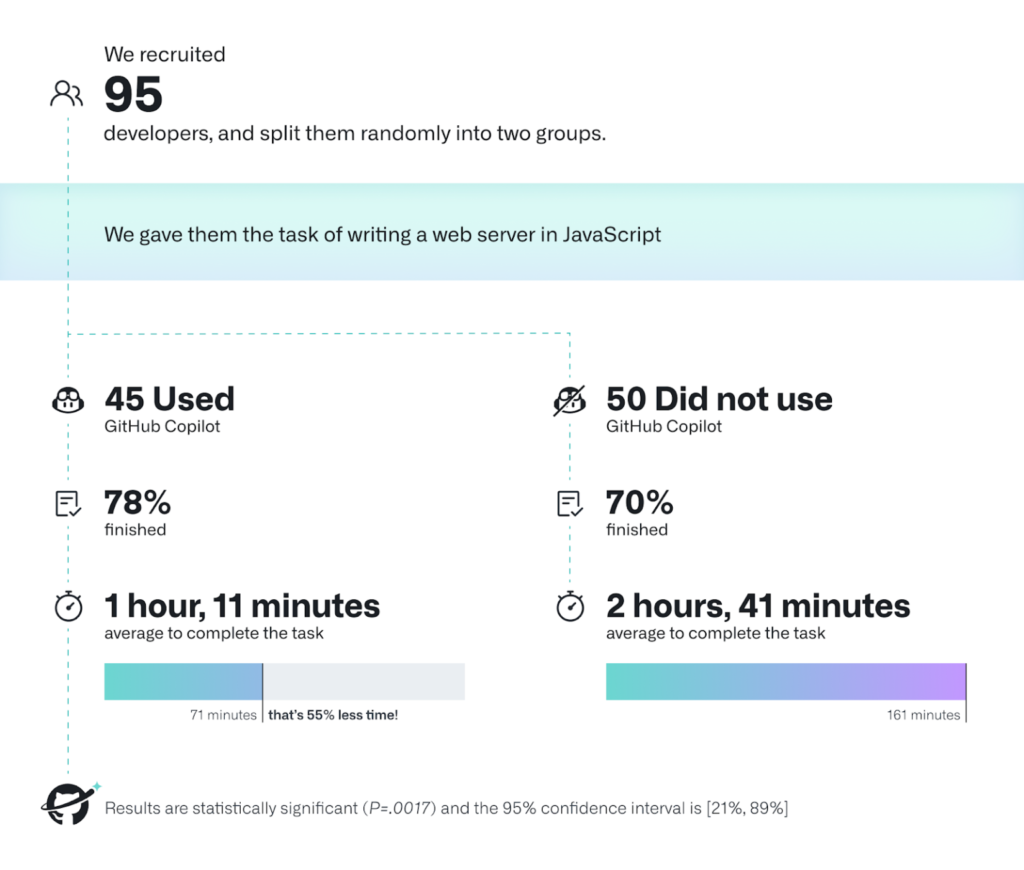
The same shape shows up when finance teams automate reconciliations or support teams automate triage. The work doesn’t just go faster. People stop dreading Mondays.
Jason Ledbetter has spent years helping B2B teams rebuild their marketing operations around automation.
He says, “The teams that win with automation are never the ones with the fanciest stack. They’re the ones that picked one ugly, repetitive process, fixed it end to end, and showed everyone the hours coming back.
Momentum does the rest. Once people feel what it’s like to stop doing the work they hated, they start hunting for the next thing to automate on their own.”
Where to start, and where not to
Sequencing is the whole game with automation. Get it wrong, and you burn trust on a fragile workflow that breaks in week two.
- High-volume, low-judgment tasks first. Intake forms, ticket routing, weekly report assembly. Boring wins build momentum; ambitious failures kill it.
- No-code where possible. Power Automate, Zapier, RPA platforms. Waiting six weeks for an IT ticket is how automation initiatives die.
- Keep humans in the loop for exceptions. Design the handoff explicitly: when confidence is low, or stakes are high, a person sees it. Not as a fallback. As the design.
- Measure the reclaimed hours and reinvest them visibly. If the time saved just evaporates into more meetings, the team notices, and the next automation gets resistance.
- Document every workflow. Automations built by one person and understood by nobody else become liabilities the day that person changes roles.
Strategy 3: Catalyzing Creativity
There’s a persistent fear that AI flattens creative work into sameness. That happens when teams treat the first output as the final output.
Used differently, generative tools do something more interesting: they lower the cost of a starting point to nearly zero, which means teams can react to a hundred angles instead of laboring over three.
Reacting is faster than inventing. Most creative professionals know this instinctively; it’s why briefs exist.
The practical toolkit is short. Language models for briefs, user stories, and concept variations. Image and video generators for mood boards and storyboards. Simulation tools for testing copy and layout variants before anything ships.
This shows up in physical products too. A design team mocking up custom t-shirts for a product launch or company event can generate a dozen layout directions in an afternoon, then spend their real energy refining the two that actually work.
Making it a team habit instead of a party trick:
- Run AI-augmented brainstorms with a critique step. Generate twenty unconventional angles, then have the team tear them apart and combine the survivors. The value is in the reaction, not the generation.
- Build a shared prompt library. What works for one person should compound for everyone. Otherwise you’re paying the same learning cost eight times.
- Push depth where the model gives breadth. AI covers the map; humans go deep on customer insight, constraint, and taste. Draw that line explicitly, or the output drifts generic.
- Protect IP and privacy. Sensitive concepts stay in secure environments. Watermark drafts. One accidental publish teaches this lesson expensively.
Strategy 4: Personalizing Growth
Corporate training has promised personalization for two decades and delivered a course catalog.
AI is the first thing that actually closes the gap: adaptive platforms that suggest content tied to live projects, generate practice scenarios, and give fast feedback on writing and analysis.
This one deserves more attention than it gets. Retention follows development, and development finally scales.
Healthcare figured this out before HR did.
Telehealth clinics offering trt therapy now tailor protocols to individual labs, goals, and response data rather than running everyone through the same template, and patient outcomes improved because of it. Employee development is finally catching up to the same logic.
The setup is straightforward. Define the skills that matter per role and map where each person sits today. Let adaptive paths suggest micro-learning attached to real work, not shelf courses.
Have managers review AI-generated feedback and add the human layer, which would be context, stretch goals, the conversation the platform can’t have. Then measure outcomes that matter: project quality, speed, error rates before and after. Course completion is a vanity metric.
One thing to guard deliberately: equitable access. The people with the heaviest workloads are usually the ones who most need skill-building time, and least get it. That doesn’t self-correct. Put it on the calendar.
For the wider view on where skill demand is heading, the World Economic Forum’s Future of Jobs report is a useful signal.
Strategy 5: Closing the Distance Gap
Hybrid work stopped being temporary a long time ago. What hasn’t stopped is the tax it puts on alignment, decisions made in a Slack thread three time zones away, meetings recorded but never watched, the same context re-explained four times.
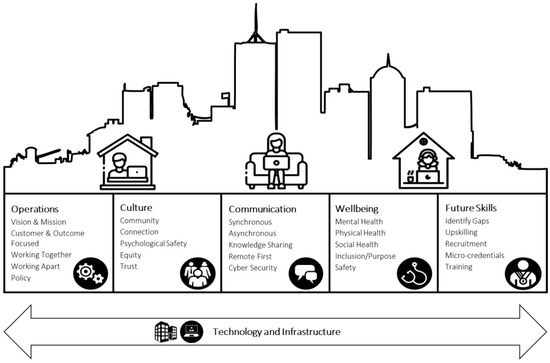
AI features earn their keep here in unglamorous ways:
- Meeting summaries shared within the hour. Notes and action items while the conversation is still warm, not a week later when nobody remembers who owned what.
- Translation and transcription by default. Cross-border teams get measurably more inclusive when nobody has to process a second language at meeting speed.
- Real-time co-authoring with AI drafts. One person seeds the doc, the group refines in comments. Faster than serial handoffs, better than a blank page.
- Explicit collaboration norms. What goes async. What earns a meeting. Where decisions get recorded. Boring agreements, massive payoff.
The research points the same direction as Strategy 2: knowledge workers who adopted AI reported time savings and higher-quality output, where norms and training existed. The pattern is consistent enough to treat as a rule.
Where Implementations Actually Break
Rarely on the technology. The models work. What breaks is people and process, and it breaks in predictable places.
Fear is the big one. People who suspect the tool exists to replace them will resist it in ways that never show up in a survey: slow adoption, workarounds, data that mysteriously stays in personal spreadsheets.
The only fix is transparency about what AI will and won’t do, backed by visible behavior. Show the tedious work coming off plates. Say what happens to the reclaimed time.
Beyond fear, a short list of guardrails:
- Pilot on pain the team already feels. Not on the use case that looks good in a board deck.
- Upskill managers first. They convert strategy into daily habit. Give them playbooks, prompts, and clear boundaries.
- Keep humans reviewing outputs in sensitive or regulated work. Law firms handling medical negligence claims don’t let AI summaries go to clients without a solicitor’s review, and that discipline should be the default anywhere errors carry legal or human cost. Set the thresholds explicitly rather than trusting judgment in the moment.
- Take the risk register seriously. Bias, privacy, IP leakage, hallucination. The NIST AI Risk Management Framework gives you structure without ceremony.
- Build light governance. A simple intake for new use cases, approved data sources, tracked model performance. If you touch the EU, stay current with the AI Act timeline. For privacy specifics, the UK ICO’s guidance on AI and data protection is more practical than most.
Governance has a reputation as the thing that slows everything down. Done light, it’s the opposite. It’s what lets you say yes to the next use case quickly because the checklist already exists.
Where to Go From Here
Pick one use case this month. Write down the outcome you want, the data you’ll need, and how you’ll know it worked. Run it, share the results whether they flatter you or not, and let the team shape what comes next.
Leaders who treat AI as a skill they’re building in public pull their teams along without a mandate. The ones who treat it as a procurement decision get shelfware.
Building this kind of leadership capacity takes more than tools — it takes knowing how you show up as a leader. Leadership Circle offers assessments and development frameworks that help leaders see their own patterns as clearly as AI sees their data.